Monday, 17 February 2025

How to add Github profile to Linkedin ?


How to add Github account profile to LinkedIn prfile for better profile visibility.

Steps : 
Open LinkedIn
1 : Navigate to Profile section.
2 : Click on "Add profile section".
3 : Pop-up modal will open,  expand "Recommended.
4 : Click on "Add featured" and new Fatured layout will be load.
5 : Click on +  plus icon. then select "Add a link"
6 : Now login to Github and navigate to your profile.
7 : Copy profile page URL and paste in text box opened in step 5 and click "Add"
In Title field : use can specify like "Github Profile" or any thing 
8 : https://www.linkedin.com/feed/

For step by step process, you can go through bellow video

Thursday, 19 December 2024

c# In multilevel inheritance, from child call parent class method by base keyword then observe behaviour

Thursday, 12 December 2024

How to Integrate Swagger in .NetCore Web API project

Aim: Integrate Swagger in .NetCore Web API project
 (Visual Studio 2022 +  .NET 6)
 
1: Create new Web API project (without swagger built in integration)
We are not using OpenAPI in built from Demo.
We do all manually for better understanding
2: Install NuGet Package: SwashbuvkleAspNetCore
3: Update Program.cs file
    Builder.Services.AddSwaggerGen();
4:    Register Middleware
app.UseSwagger();
app.UseSwaggerUI()
 
To load swagger when we run project/ when we run project, landing page is swagger, 
need to update launchsetting.json file.
- set launchUrl to "swagger"

For step by step detail, watch video.

Sunday, 1 December 2024

How to add Stackoverflow profile to In LinkedIn profile ?

Sunday, 26 May 2024

C# Custom Data Data Annotation - Validators with Example

 (1) What is Custom Data Annotations in C# model class? 

       When Custom Data Annotation useful? 

Ans : You have learn and regular and basic Data Annotation for validaion.

We  can apply validation at Model (POCO) class by using appropriate attribute.
Like Required, StringLength, MaxLength, EmailAddress and many more.

Now add following code for UI side
@model WebAppCustomDataAnnotation.Models.Student
<h2>Create</h2>

@using (Html.BeginForm()) 
{    
    <div class="form-horizontal">
        @Html.ValidationSummary(true, "", new { @class = "text-danger" })
        <div class="form-group">
            @Html.LabelFor(model => model.Name, htmlAttributes: new { @class = "control-label col-md-2" })
            @Html.EditorFor(model => model.Name, new { htmlAttributes = new { @class = "form-control" } })
            @Html.ValidationMessageFor(model => model.Name, "", new { @class = "text-danger" })
        </div>

        <div class="form-group">
            @Html.LabelFor(model => model.Email, htmlAttributes: new { @class = "control-label col-md-2" })
            @Html.EditorFor(model => model.Email, new { htmlAttributes = new { @class = "form-control" } })
            @Html.ValidationMessageFor(model => model.Email, "", new { @class = "text-danger" })
        </div>

        <div class="form-group">
            <input type="submit" value="Create" class="btn btn-default" />
        </div>
    </div>
}


@section Scripts {
    @Scripts.Render("~/bundles/jqueryval")
}
In this post we focus on custom Data Annotation.


When default attribute not sufficient to achieve our validation.
When validation is not achievable by Microsoft provided attribute


For example - We have a Student table in Data base.


Before saving record, We need to check EMail value must be unique.

But this is not achievable my available basic attribute.
But to tackle this limitation, we have Custom Data Annotation.
Assume system already contain email - "name@company.com"
If user try to insert same value again then validation must be there.
and error message will be prompt.

Create new class :

UniqueEmailAttribute and inherit ValidationAttribute.

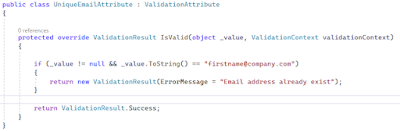
public class UniqueEmailAttribute : ValidationAttribute { protected override ValidationResult IsValid(object _value, ValidationContext validationContext) { if (_value != null && _value.ToString() == "name@company.com") { return new ValidationResult(ErrorMessage = "Email address already exist"); } return ValidationResult.Success; } }


Here we have create Custom Data Annotation. 
It contain IsValid() method.
We have override this method and added logic to check existing value.

Provided Email value come at first parameter : object _value

If input email value is "name@company.com" then
it will return Error message.

Otherwise will return Success.(Validation passed)

You can provide error message as per your requirement.

This Method return ValidationResult.

Final Step :
Now add this created custom data annotation as attribute 
at Email property in Student class.
[Required(ErrorMessage = "Email address is required.")]
[UniqueEmail]
public string Email { get; set; }


Here error message is hard coded. but in real scenario it never happen.
So error message must be dynamicaly need to set.
In Student model - along with custom attribute "UniqueEmail", 
need to add ErrorMessage as shown in bellow.


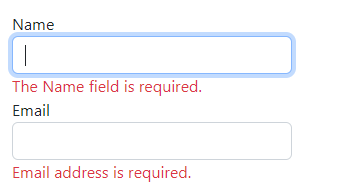
As Error message set in Attribute, will show in bellow display 
when in Email field value added and "Create" button clicked as shown bellow.


Saturday, 26 August 2023

SQL Part-2 : How to swap two column values​​ in same table ?

 Note :  All questions are related to SQL Server.

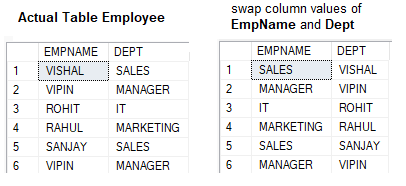
(1) In SQL : How to swap two column values​​ ?


Ans : 
update #tempSwap set EMPNAME = DEPT, DEPT = EMPNAME;

NOTE : I used temptable for demo purpose.
Assume I have to perform operation on Employee table then query will be 

update Employee set EMPNAME = DEPT, DEPT = EMPNAME;


Tuesday, 1 August 2023

SQL interview question Part-1

Note :  All sql related question related to SQL Server.

(1) How to get current Age based on BirthDate ?

SELECT top 5 BirthDate,  DATEDIFF ( YEAR ,BirthDate , getdate() )  as age,LoginID

  FROM [HumanResources].[Employee]


(2)  What is the output when you concate two null value using plus '+'  operator ?
        SELECT NULL +  NULL;

Ans : It will resturn single null value.


(3)  What is the output when you concate two null value using CONCATE function ?
        SELECT CONCAT (NULL, NULL)

Ans : It will resturn empty string/ blank value.


(4)  What is the output of the following code ?
        
DECLARE @TempVariable AS NVARCHAR(50)
SET @TempVariable = 'Hello World'

PRINT @TempVariable

Ans : "Hello World"


(5)  What is the output of the following code ?

DECLARE @TempVariable AS NVARCHAR(50)
SET @TempVariable = 'Hello World'

GO
PRINT @TempVariable

Ans : It will gices error. - Must declare the scalar variable "@PurchaseName".
Reason is local variable scope expires at the end of the batch once "Go" statement came.

(6)  Teacher table have 6 records, contain LastName valiues as shown in bellow.


What is the output of the following code ?

declare @tempLastName nvarchar(50);

select @tempLastName = LastName from [EF_Demo_DB].[dbo].Teacher;

select @tempLastName;

Ans : Jena

Explanation : Value of LastName of last record will be set in local variable @tempLastName.


(7)  What is output of following code snipet.

print null;

Ans : Blank 
Explanation : We can't print null value in sql server.


(8)  What is output of following code snipet.

Declare @localvariable nvarChar(50) =  NULL;

PRINT @localvariable + 'Tech for Boost';

Ans : Blank 
Explanation : concate with null value return blank value.


(9)  What is output of following code snipet.

declare @localvariable nvarchar(50) =  NULL;

PRINT 'Tech for Boost' + @localvariable;

Ans : Blank 
Explanation : concate with null value return blank value.

Null value containted variable when concated using '+' operator then it is first position or second position does not matter.

but concation of null value using CONCAT function gives different result. Let's see with example.


(10)  What is output of following code snipet.

declare @localvariable nvarchar(50) =  NULL;

print CONCAT('Tech for Boost', @localvariable);

-- or
print CONCAT(@localvariable, 'Tech for Boost');

Ans Tech for Boost


(11)  Can we use GROUP BY clause without aggregate function ?

Ans Yes, let's see with example. We have table EmployeeSalary